
Eliminates Tab Overload
No more keeping 6 pinned webmail tabs that constantly consume RAM and distract your workflow. Access every inbox in your browser's dedicated side panel beside your work.
Aggregate all your personal and work Gmail and Microsoft Outlook inboxes into one unified stream. Triage unread emails, preview attachments, and generate on-device AI summaries without ever switching browser tabs.
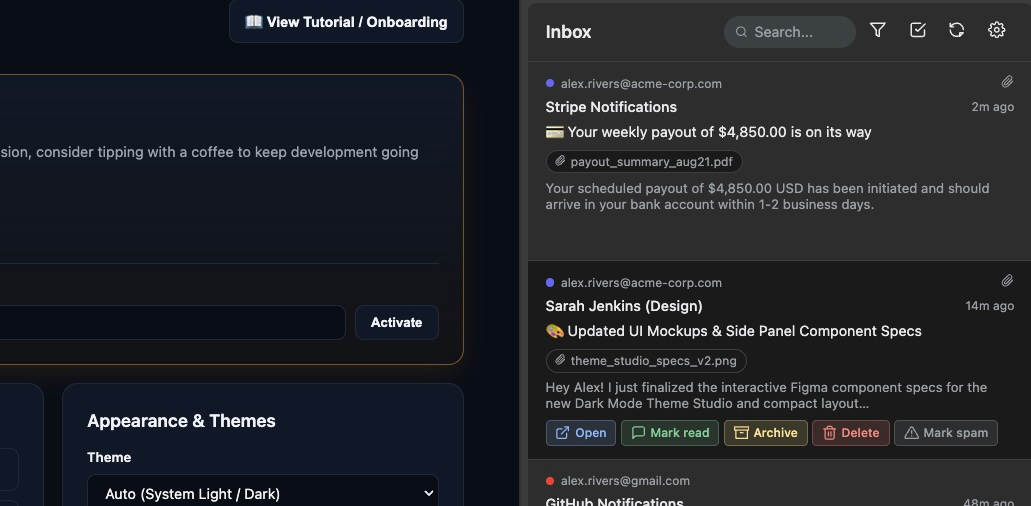
Managing 3+ email accounts across different providers is one of the biggest productivity drains. Multi-Inbox Checker Pro solves the 4 fundamental flaws of modern email management.
No more keeping 6 pinned webmail tabs that constantly consume RAM and distract your workflow. Access every inbox in your browser's dedicated side panel beside your work.
Unify Google Workspace, personal @gmail.com, and Microsoft Outlook / Office 365 inboxes into one unified, color-coded, conversation-grouped inbox stream.
Unlike third-party email aggregators that read and store your emails on their cloud servers, Multi-Inbox Checker Pro runs 100% locally in your browser with direct OAuth2.
See why power users, developers, and founders choose Multi-Inbox Checker Pro over clunky alternatives.
| Capability / Feature | Multi-Inbox Checker Pro ⭐ | Multiple Webmail Tabs | Desktop Apps | Cloud Aggregators |
|---|---|---|---|---|
| Browser Side Panel Integration | ✓ Native Side Panel (Chrome & Edge) | ✗ Requires Tabs | ✗ Separate Window | ✗ Separate Tab / App |
| Zero-Server Data Privacy | ✓ 100% On-Device | ✓ Direct | ✓ Local | ✗ Third-Party Server Storage |
| Gmail & Outlook Unified Feed | ✓ Unified & Color-Coded | ✗ Separate Logins | ✓ Unified | ✓ Unified |
| RAM & Resource Overhead | ✓ Minimal (MV3 Worker) | ✗ High (1GB+ RAM) | ✗ Heavy (Electron/Native) | ✗ High Memory Usage |
| On-Device AI Thread Summaries | ✓ Gemini Nano (Free) | ✗ None / Paid Addon | ✗ None | ✗ Cloud LLM ($20-$30/mo) |
| 10-Second Durable Undo | ✓ Session-Backed Undo | ✗ Provider Dependent | ✗ Limited | ✓ Available |
| Pricing & License | ✓ 100% Free & Open-Source | ✓ Free | ✗ Paid Licenses | ✗ $30/month Subscription |
Everything you need for frictionless email triage without the bloat.
Connect multiple personal and enterprise Gmail and Outlook / Office 365 inboxes in one unified, color-coded stream with conversation thread grouping.
Zero backend servers. Your emails, tokens, and credentials are encrypted on your local machine and communicate exclusively with Google and Microsoft APIs.
Generate instant 3-bullet thread takeaways using the browser's built-in on-device Prompt API with zero cloud latency and zero server subscriptions.
Personalize your workspace with Midnight OLED (#000000), Nordic Frost, Modern Slate, and Minimalist themes with comfortable or dense compact layout modes.
Accidentally archive or delete an important email? Undo any triage action instantly with session-recovered countdown toasts backed by extension session storage.
Safely inspect PDFs, images, documents, audio, and video attachments in isolated tabs with strict sandboxing and automatic memory cleanup on close.
Navigate with j / k (or arrows), sync with r, instant search with /, and escape with Esc for maximum keyboard efficiency.
Detects standard List-Unsubscribe headers on newsletters and marketing emails, giving you a direct 1-click unsubscribe button directly in thread headers.
Select multiple emails with checkboxes to batch mark as read, batch archive, or batch delete across all connected accounts in a single click.
Get started in under 60 seconds. No credit card, no account creation, no server setup.
Install Multi-Inbox Checker Pro from the Chrome Web Store or Edge Add-ons. Pin the extension to your toolbar to keep your unread badge count always visible.
Click "+ Gmail" or "+ Outlook" to authorize your email accounts via direct OAuth2. Add as many personal and work accounts as you need.
Click your pinned extension icon to open the built-in side panel. Read, archive, search, and preview attachments without ever switching tabs.
Common questions about Multi-Inbox Checker Pro, security, and multi-inbox productivity.
Multi-Inbox Checker Pro is the best way to manage multiple inboxes in Google Chrome and Microsoft Edge. Instead of keeping 5+ pinned webmail tabs that drain memory and distract your focus, Multi-Inbox Checker Pro unifies all your Gmail and Outlook inboxes into the native Side Panel. You get a single color-coded stream, unread count badges, instant thread search, keyboard shortcuts, and attachment previews right beside your active browsing tabs.
With Multi-Inbox Checker Pro, you can connect an unlimited number of Gmail and Microsoft Outlook / Office 365 accounts via standard OAuth2 authentication. All messages are aggregated into a single chronological feed inside your browser's side panel, allowing you to read, archive, delete, or mark emails as spam across all accounts without logging in and out.
Yes, 100% private and secure. Multi-Inbox Checker Pro has a true client-side zero-server architecture. Your browser connects directly to official Google and Microsoft APIs. Your emails, tokens, and credentials are encrypted on your local machine and never touch any third-party database or intermediary server.
Multi-Inbox Checker Pro utilizes the built-in on-device Prompt API (Gemini Nano) to distill lengthy conversation threads into 2-3 concise action points. Because the AI model runs locally on your machine, it has 0 latency, 0 server cost, and complete privacy with no email text ever uploaded to cloud LLMs.
Multi-Inbox Checker Pro supports full keyboard productivity:
j / ↓: Move focus to the next email item.k / ↑: Move focus to the previous email item.Enter / Space: Open thread in detailed view.r: Instantly refresh all connected inboxes./: Focus the instant search bar.Esc: Exit detail view, close search, or dismiss filter menu.Yes. Clicking any attachment chip opens a secure, sandboxed preview tab supporting PDFs, images, code files, text documents, audio, and video directly in your browser with strict isolation and automatic memory revocation on tab close.
Yes, Multi-Inbox Checker Pro is 100% free and open-source under the MIT License. You can also optionally support independent development with a tip to unlock custom theme studio perks and a 100% ad-free experience.
Multi-Inbox Checker Pro communicates directly between your browser and official Google / Microsoft APIs. We do not operate tracking databases, telemetry servers, or remote loggers. Your inbox remains exclusively yours.
Multi-Inbox Checker is free and built with care. If it saves you time every day, consider tipping to support development and unlock exclusive OLED themes!
Support this extension